
Save content as draft, needs review, and more.
This guide demonstrates the content moderation feature, which is available from the “Content” menu in Drupal and when editing individual content items.
Content moderation allows users to save content in distinct states along a save-state spectrum to facilitate flexible publishing workflows. Each time you save content, Drupal creates a new revision (version) of that content. Each revision has a state (such as draft, needs review, or published) that indicates how close it is to being live. Only one revision of a content item can be live (published) at a time.
Saving content states
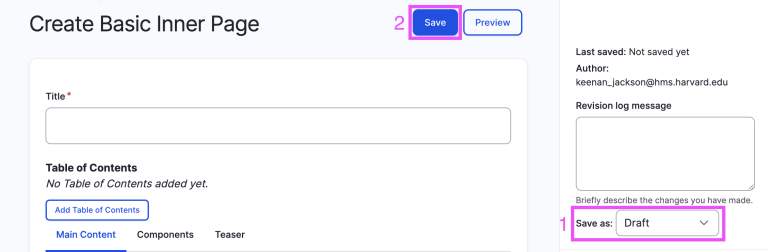
To save content as a specific state:
- In the Settings panel on the right*, open the Save as dropdown to select the desired state.
- At the top of the page, select Save.
*If you don’t see the Settings panel, try enlarging your window or reducing your browser zoom until it appears.
Save-state spectrum
The content moderation feature currently supports five distinct states: draft, needs review, published, unpublished, and archived. The following table describes the status indicated by each state.
| State | Status |
| draft | content in early-stage development |
| needs review | content in end-stage development |
| published | published content |
| unpublished | content that was formerly published but is no longer live |
| archived | content that was formerly published, is no longer live, and is maintained for admin reference and historical purposes |
Workflow
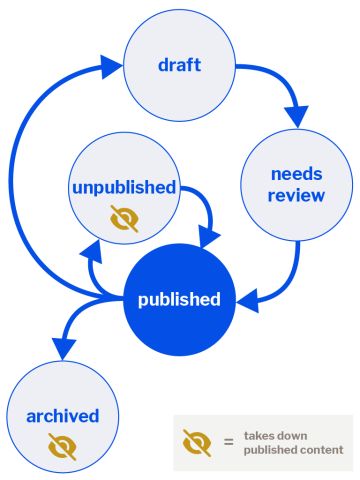
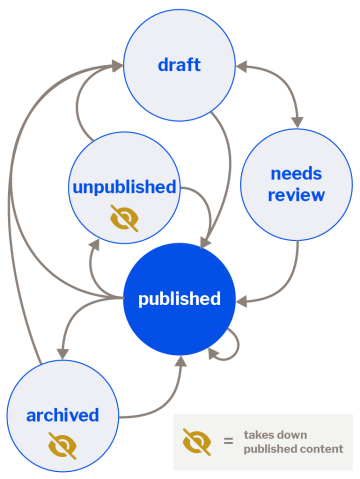
Content moderation states are intended to be flexible. Design workflows that work best for your team’s unique needs. To get started, the following workflows are recommended.
Publishing new content
Consider a linear process from draft → needs review → published.
To make content live, save the revision as published.
Updating published content
Make changes live immediately
Save the revision as published.
Edit in the background while keeping the latest published revision live
Save the revision as draft (the published revision stays live).
Temporarily remove content while editing
Save the revision as unpublished.
When ready to publish, save the updated revision as published.
Sunsetting
To permanently remove content from the site by keep a record for admins, save the revision as archived.
Recommended workflows
All possible workflows
Role permissions
Users have distinct content moderation permissions based on their assigned role.
| Role | Save as…draft | ...needs review | ...published | ...unpublished | ...archived |
| Contributor | Yes | Yes | No | No | No |
| Publisher and Content Admin | Yes | Yes | Yes | Yes | Yes |
Set up or change permissions
If your workflow requires that certain users have restricted permissions, please contact Evan Sanders, Digital Product Manager at evan@hms.harvard.edu to discuss.
Help us understand your use
Have you crafted a unique workflow using save-states for your team? Do you have ideas for improvements? We’d love to hear! Share your story with Evan Sanders, Digital Product Manager, at evan@hms.harvard.edu.